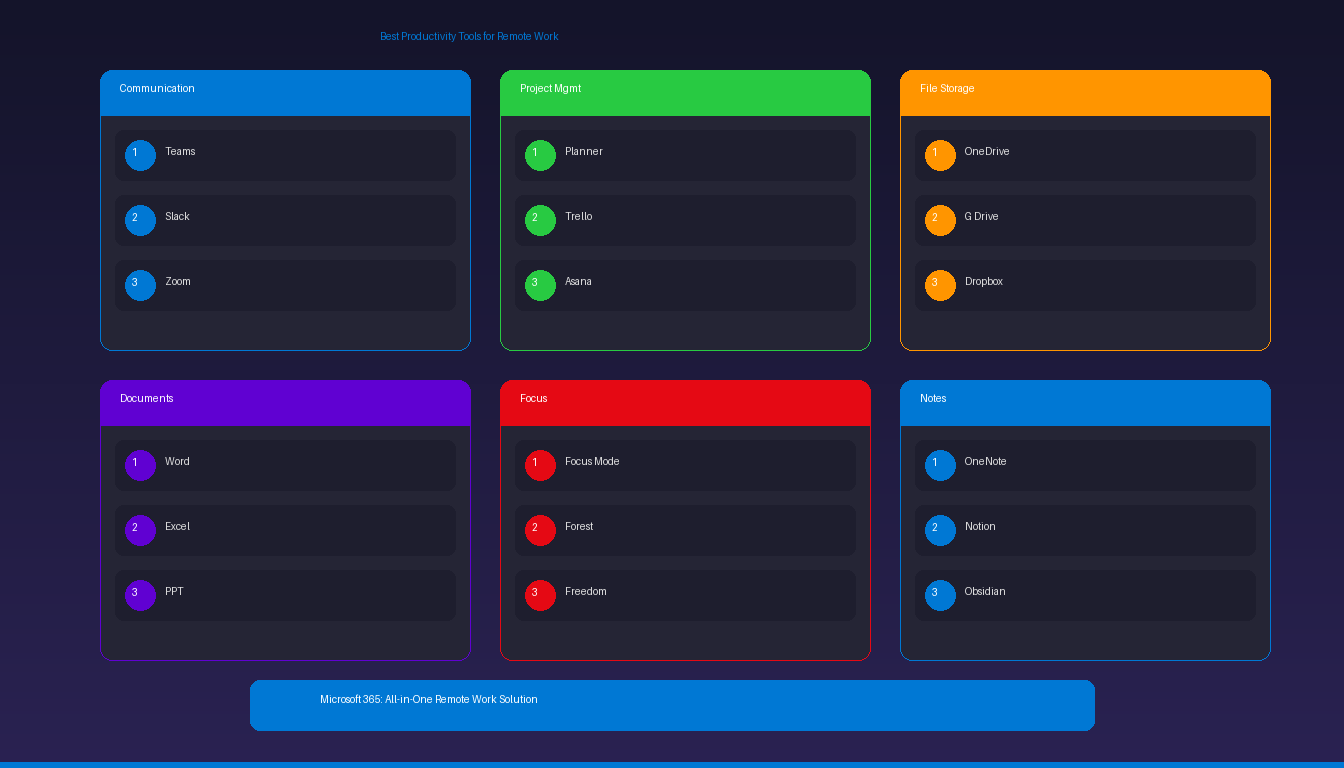
Remote work requires the right tools to stay productive, communicate effectively, and manage projects across distributed teams. The Microsoft 365 stack covers most needs — Teams for communication, Outlook for email, OneDrive for files, and the full Office suite for document creation. This guide covers the essential tools across every category. For optimizing your Windows setup, see our best productivity software for Windows guide.
Key Takeaways
- Microsoft 365 provides an all-in-one remote work solution: Teams (communication), Outlook (email), OneDrive (1 TB storage), Planner (tasks), and the full Office suite — starting at $6/user/month.
- For teams not on Microsoft 365, combine best-of-breed tools: Slack or Zoom for communication, Notion or Asana for project management, and Google Drive or Dropbox for file storage.
- A standalone Microsoft Office license (one-time purchase) provides Word, Excel, PowerPoint, and Outlook without the cloud collaboration features of Microsoft 365.
What Are the Best Communication Tools for Remote Work?
Microsoft Teams and Slack are the two leading platforms for remote team communication — Teams integrates deeply with the Microsoft ecosystem, while Slack offers broader third-party app integrations.
| Tool | Best For | Price | Key Features |
|---|---|---|---|
| Microsoft Teams | Microsoft 365 organizations | Included with M365 | Chat, video calls, file sharing, channels, app integrations |
| Slack | Cross-platform teams | Free / $8.75/user/mo | Channels, threads, 2,600+ app integrations, search |
| Zoom | Video meetings | Free / $13.33/user/mo | HD video, breakout rooms, recording, webinars |
| Google Meet | Google Workspace teams | Included with Workspace | Browser-based, no download, calendar integration |
| Discord | Informal/creative teams | Free / $2.99/mo (Nitro) | Voice channels, screen share, community features |
For scheduling Teams meetings directly from your calendar, see our schedule Teams meetings from Outlook guide.
What Are the Best Project Management Tools?
Microsoft Planner, Trello, and Asana help remote teams organize tasks, track progress, and manage deadlines — choose based on your team size and complexity needs.
| Tool | Best For | Price | Key Features |
|---|---|---|---|
| Microsoft Planner | M365 teams | Included with M365 | Kanban boards, task assignments, due dates, Teams integration |
| Trello | Small teams, visual learners | Free / $5/user/mo | Drag-and-drop boards, Power-Ups, automation |
| Asana | Mid-size teams | Free / $10.99/user/mo | Timeline, workload management, goals, reporting |
| Notion | All-in-one workspace | Free / $10/user/mo | Docs + databases + tasks + wikis in one |
| Monday.com | Large teams, complex projects | $9/seat/mo | Automations, dashboards, integrations |
| ClickUp | Feature-rich alternative | Free / $7/user/mo | Docs, whiteboards, goals, time tracking |
For creating project timelines in Excel, see our Excel Gantt chart tutorial.
What Are the Best File Storage and Sharing Tools?
OneDrive, Google Drive, and Dropbox provide cloud storage for accessing files from anywhere — the right choice depends on which productivity suite your team uses.
| Tool | Storage (Free) | Storage (Paid) | Best For |
|---|---|---|---|
| OneDrive | 5 GB | 1 TB (with M365) | Microsoft 365 users |
| Google Drive | 15 GB | 2 TB ($9.99/mo) | Google Workspace users |
| Dropbox | 2 GB | 2 TB ($11.99/mo) | Cross-platform file sharing |
| SharePoint | Included with M365 | Included | Team sites, document libraries |
| Box | 10 GB | 100 GB ($15/user/mo) | Enterprise, compliance-heavy |
OneDrive integrates directly with Microsoft Office — open, edit, and save files without downloading. For Outlook file management, see our Outlook archive setup guide.
What Are the Best Document Creation Tools?
Microsoft Office (Word, Excel, PowerPoint) remains the standard for professional document creation — available as a one-time purchase or through Microsoft 365 subscription.
| Tool | Best For | Price |
|---|---|---|
| Microsoft Word | Professional documents, reports | Included in Office 2024 / M365 |
| Microsoft Excel | Data analysis, spreadsheets | Included in Office 2024 / M365 |
| Microsoft PowerPoint | Presentations | Included in Office 2024 / M365 |
| Google Docs/Sheets/Slides | Real-time collaboration (free) | Free / Workspace $7/user/mo |
| Notion | Flexible docs + databases | Free / $10/user/mo |
| Canva | Visual design, social media | Free / $13/user/mo (Pro) |
Microsoft 365 vs Office 2024 for Remote Work
| Feature | Microsoft 365 | Office 2024 (One-Time) |
|---|---|---|
| Price | $6-12.50/user/mo | $199.99 (lifetime) |
| Apps | Word, Excel, PPT, Outlook, Teams | Word, Excel, PPT, Outlook |
| Cloud storage | 1 TB OneDrive | Not included |
| Teams | Included | Not included |
| Updates | Continuous new features | Security patches only |
| Copilot AI | Available (add-on) | Not available |
| Best for | Teams needing collaboration | Individuals needing Office apps |
For budget-conscious remote workers who need Office without a subscription, Microsoft Office 2024 Professional Plus ($199.99) or Office 2021 Professional Plus ($64.99) provide lifetime licenses.
What Are the Best Focus and Time Management Tools?
Windows Focus mode, Pomodoro timers, and website blockers help remote workers maintain concentration and avoid distractions during deep work sessions.
| Tool | Type | Price | Key Features |
|---|---|---|---|
| Windows Focus | Built-in OS feature | Free | Suppress notifications, set focus sessions |
| Forest | Focus timer (gamified) | $3.99 | Grow virtual trees during focus sessions |
| Freedom | Website/app blocker | $8.99/mo | Block distracting sites across all devices |
| Toggl Track | Time tracking | Free / $9/user/mo | Track time per project, reports, invoicing |
| Clockify | Time tracking | Free / $3.99/user/mo | Unlimited tracking, timesheets, reports |
| RescueTime | Automatic tracking | Free / $12/mo | Automatic activity tracking, productivity score |
For configuring Windows Focus mode and notification management, see our Windows 11 quick settings guide.
What Are the Best Note-Taking Tools for Remote Workers?
OneNote, Notion, and Obsidian capture meeting notes, ideas, and reference material — choose based on whether you need collaboration or personal knowledge management.
| Tool | Best For | Price | Sync |
|---|---|---|---|
| Microsoft OneNote | M365 users, free-form notes | Free (standalone) / M365 | OneDrive |
| Notion | Team wikis + databases | Free / $10/user/mo | Cloud |
| Obsidian | Personal knowledge base | Free / $50/yr (sync) | Local + optional cloud |
| Evernote | Web clipping, search | Free / $14.99/mo | Cloud |
| Apple Notes | Apple ecosystem | Free | iCloud |
OneNote is included free with Windows and integrates with Outlook — send meeting notes directly to OneNote from Outlook calendar events. For managing your Outlook workflow, see our Outlook reminders setup guide.
How Do I Build a Complete Remote Work Setup?
Combine tools from each category to create a comprehensive remote work toolkit — the Microsoft stack covers most needs for teams already using Microsoft 365.
Microsoft-First Stack (Best Integration)
| Category | Tool | Already In M365? |
|---|---|---|
| Communication | Microsoft Teams | Yes |
| Outlook | Yes | |
| File storage | OneDrive / SharePoint | Yes |
| Documents | Word, Excel, PowerPoint | Yes |
| Tasks | Planner / To Do | Yes |
| Notes | OneNote | Yes |
| Focus | Windows Focus mode | Free (Windows) |
| Time tracking | Clockify (add-on) | No (free tier) |
Best-of-Breed Stack (Maximum Flexibility)
| Category | Tool | Price |
|---|---|---|
| Communication | Slack + Zoom | $8.75 + $13.33/user/mo |
| Gmail / Outlook | Free / M365 | |
| File storage | Google Drive | Free (15 GB) |
| Documents | Google Docs | Free |
| Tasks | Asana or Notion | Free tier available |
| Notes | Notion or Obsidian | Free |
| Focus | Forest + Freedom | $3.99 + $8.99/mo |
| Time tracking | Toggl Track | Free tier available |


