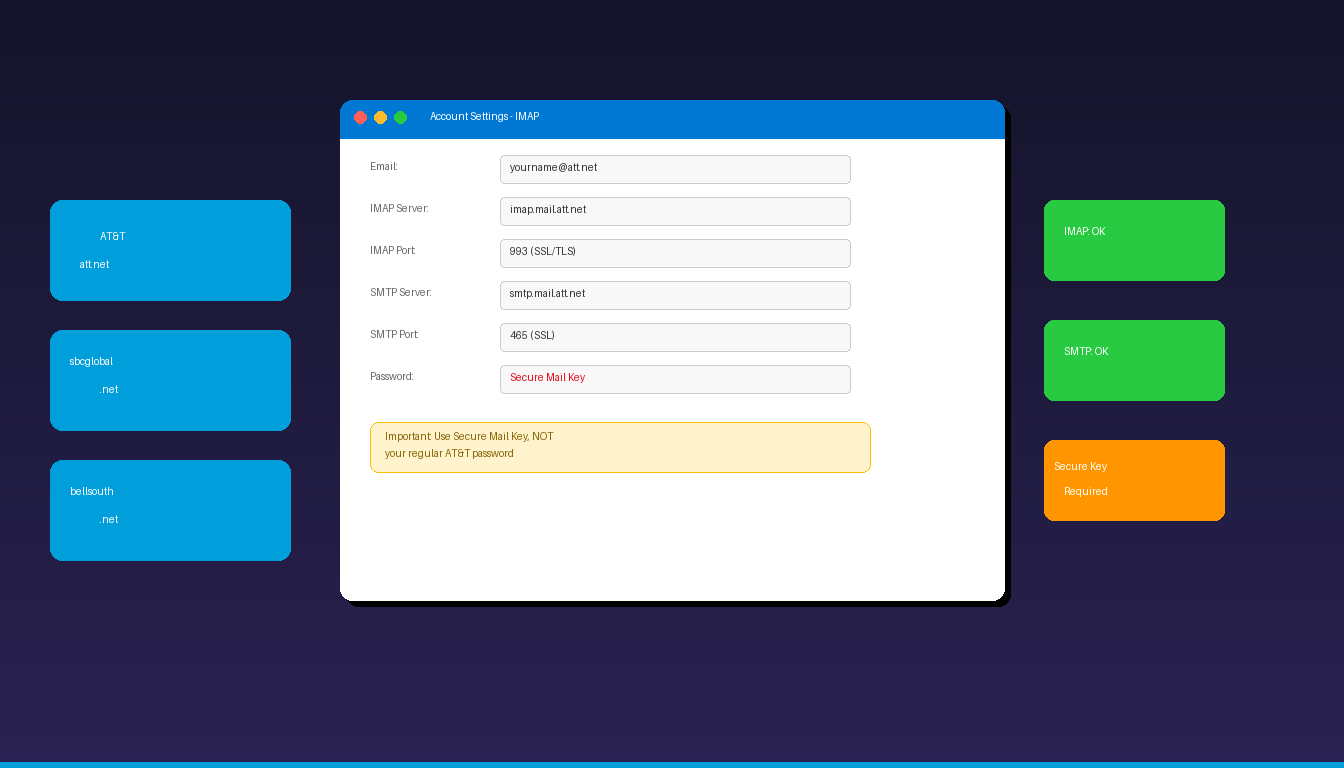
AT&T email accounts (att.net, sbcglobal.net, bellsouth.net) connect to Microsoft Outlook using IMAP and SMTP with one critical requirement: you must generate a Secure Mail Key instead of using your regular AT&T password. This key is required for all third-party email apps including Outlook. Once your AT&T email is connected, complete the setup with a professional email signature.
Key Takeaways
- AT&T email uses IMAP server
imap.mail.att.neton port 993 (SSL) and SMTP serversmtp.mail.att.neton port 465 (SSL) or 587 (STARTTLS). - You must generate a Secure Mail Key from your AT&T account settings — your regular AT&T password will not work in Outlook.
- AT&T email is hosted on Yahoo infrastructure, so att.net, sbcglobal.net, and bellsouth.net addresses all use the same server settings.
What Are the IMAP and SMTP Settings for AT&T Email?
AT&T email connects to Microsoft Outlook using imap.mail.att.net for incoming mail and smtp.mail.att.net for outgoing mail, both requiring SSL encryption and a Secure Mail Key for authentication.
| Setting | Value |
|---|---|
| Incoming Server (IMAP) | imap.mail.att.net |
| IMAP Port | 993 |
| IMAP Encryption | SSL/TLS |
| Outgoing Server (SMTP) | smtp.mail.att.net |
| SMTP Port | 465 (SSL) or 587 (STARTTLS) |
| SMTP Encryption | SSL/TLS or STARTTLS |
| Username | Your full AT&T email address |
| Password | Secure Mail Key (not your regular password) |
| SMTP Authentication | Required |
These settings work for all AT&T email domains:
| Domain | Example |
|---|---|
| att.net | yourname@att.net |
| sbcglobal.net | yourname@sbcglobal.net |
| bellsouth.net | yourname@bellsouth.net |
| pacbell.net | yourname@pacbell.net |
| ameritech.net | yourname@ameritech.net |
All these domains are hosted on the same Yahoo-powered infrastructure and share identical IMAP and SMTP server settings. For detailed SMTP troubleshooting, see our Outlook SMTP settings guide.
What Is a Secure Mail Key and How Do I Get One?
A Secure Mail Key is an app-specific password that AT&T requires for connecting email to third-party apps like Microsoft Outlook — your regular AT&T account password will not work.
Generate a Secure Mail Key
- Open a web browser and go to myat.att.com.
- Sign in with your AT&T user ID and password.
- Click your profile icon in the top-right corner.
- Select Sign-in info or Profile.
- Scroll down to Secure mail key.
- Click Manage secure mail key.
- Click Generate to create a new key.
- Copy the key immediately — you will need to paste it into Outlook.
According to AT&T Support, the Secure Mail Key replaces your regular password for all third-party email applications. Keep the key saved in a secure location, as you will need it if you reconfigure Outlook or add your AT&T email to another device.
Alternative: Yahoo App Password
Since AT&T email runs on Yahoo infrastructure, you can also generate an app password through Yahoo:
- Go to login.yahoo.com and sign in with your AT&T email.
- Go to Account Security.
- Click Generate app password.
- Select Outlook or Other App.
- Copy the generated password and use it in Outlook.
How Do I Add AT&T Email to Outlook on Desktop?
Open Outlook, choose manual IMAP setup, enter the AT&T server settings, and use your Secure Mail Key as the password — the process takes about 5 minutes.
Step 1: Open Account Settings
- Open Microsoft Outlook on your computer.
- Click File > Account Settings > Account Settings.
- Click New to add a new email account.
Step 2: Choose Manual Setup
- Select Manual setup or additional server types and click Next.
- Choose POP or IMAP and click Next.
Step 3: Enter Server Settings
- Your Name: Your display name
- E-mail Address: Your full AT&T email (e.g., yourname@att.net)
- Account Type: IMAP
- Incoming mail server: imap.mail.att.net
- Outgoing mail server: smtp.mail.att.net
- User Name: Your full AT&T email address
- Password: Your Secure Mail Key (not your regular AT&T password)
Step 4: Configure Advanced Settings
- Click More Settings > Outgoing Server tab.
- Check My outgoing server (SMTP) requires authentication.
- Select Use same settings as my incoming mail server.
- Go to the Advanced tab.
- Set Incoming server (IMAP) port to 993 with SSL encryption.
- Set Outgoing server (SMTP) port to 465 with SSL, or 587 with TLS.
- Click OK, then Next to test the connection.
If the test passes, click Finish. If it fails, double-check that you are using the Secure Mail Key (not your regular password) and that SMTP authentication is enabled.
Why Is My AT&T Email Not Working in Outlook?
The most common cause is using your regular AT&T password instead of a Secure Mail Key — AT&T requires app-specific passwords for all third-party email clients including Outlook.
1. Use Secure Mail Key, Not Regular Password
This is the number one fix. AT&T implemented this security requirement, and your regular password will fail authentication every time. Generate a new Secure Mail Key following the steps above.
2. Verify Server Settings
| Common Mistake | Correct Setting |
|---|---|
| Wrong IMAP server | imap.mail.att.net (not mail.att.net) |
| Port 143 (no SSL) | Port 993 with SSL/TLS |
| Port 25 (blocked) | Port 465 (SSL) or 587 (STARTTLS) |
| SMTP auth disabled | Must enable authentication |
| Regular password | Must use Secure Mail Key |
3. Clear Cached Credentials
- Close Outlook completely.
- Open Windows Credential Manager (search in Start menu).
- Under Windows Credentials, find and remove entries for
att.netoryahoo.com. - Restart Outlook and enter your Secure Mail Key when prompted.
4. Check if Yahoo Sign-In Page Appears
In newer versions of Outlook, adding an AT&T email address may trigger a Yahoo OAuth sign-in page in a browser window. If this happens:
- Sign in with your AT&T email and regular password on the Yahoo page.
- Authorize Outlook to access your email.
- Outlook will configure settings automatically without needing manual IMAP setup.
If the Yahoo sign-in page does not appear, use the manual IMAP configuration with your Secure Mail Key.
5. Regenerate Your Secure Mail Key
If your existing Secure Mail Key stops working:
- Go to myat.att.com and sign in.
- Navigate to Profile > Secure mail key.
- Delete the old key and generate a new one.
- Update the password in Outlook: File > Account Settings > select your AT&T account > Change > enter the new key.
Can I Use AT&T Email With the New Outlook?
The new Outlook for Windows supports AT&T email through Yahoo OAuth — enter your AT&T email address and sign in through the Yahoo authentication page that appears automatically.
- Open the new Outlook for Windows.
- Click Settings > Add account.
- Enter your AT&T email address (e.g., yourname@att.net).
- A Yahoo sign-in page should appear in a browser window.
- Sign in with your AT&T email and regular password.
- Authorize Outlook access and the account configures automatically.
If the Yahoo sign-in page does not appear, select IMAP and enter the server settings manually with your Secure Mail Key. For adding other email providers, see our guides on Gmail in Outlook, Comcast in Outlook, and GoDaddy in Outlook.
How Do I Set Up AT&T Email on Outlook Mobile?
The Outlook mobile app for iPhone and Android supports AT&T email — it typically uses Yahoo OAuth for automatic setup.
- Open the Microsoft Outlook app on your phone.
- Tap Add Account.
- Enter your AT&T email address.
- A Yahoo sign-in screen should appear — sign in with your regular AT&T password.
- Authorize Outlook to access your email.
If automatic setup fails, toggle Advanced Settings and enter the IMAP/SMTP server settings manually with your Secure Mail Key. If you need Outlook desktop with full AT&T email support, Microsoft Office 2024 Professional Plus ($199.99) includes the classic Outlook application.
Frequently Asked Questions
Do I need a Secure Mail Key for AT&T email in Outlook?
Yes. AT&T requires a Secure Mail Key (app-specific password) for all third-party email applications including Microsoft Outlook. Your regular AT&T account password will not work. Generate a Secure Mail Key at myat.att.com under Profile > Secure mail key.
Is AT&T email the same as Yahoo email?
AT&T email is hosted on Yahoo infrastructure, but AT&T and Yahoo are separate accounts. Your att.net email address uses Yahoo’s IMAP and SMTP servers behind the scenes. This means AT&T email server settings are similar to Yahoo’s, and some authentication flows use Yahoo’s sign-in page.
Why does Outlook show a Yahoo sign-in page for my AT&T email?
Because AT&T email runs on Yahoo servers, newer versions of Outlook redirect to Yahoo’s OAuth authentication page when you add an att.net address. This is normal and expected. Sign in with your AT&T email and password on this page to authorize Outlook access.
Can I use the same settings for sbcglobal.net and bellsouth.net?
Yes. All AT&T legacy email domains — att.net, sbcglobal.net, bellsouth.net, pacbell.net, and ameritech.net — use the same IMAP server (imap.mail.att.net) and SMTP server (smtp.mail.att.net) with identical port and encryption settings.