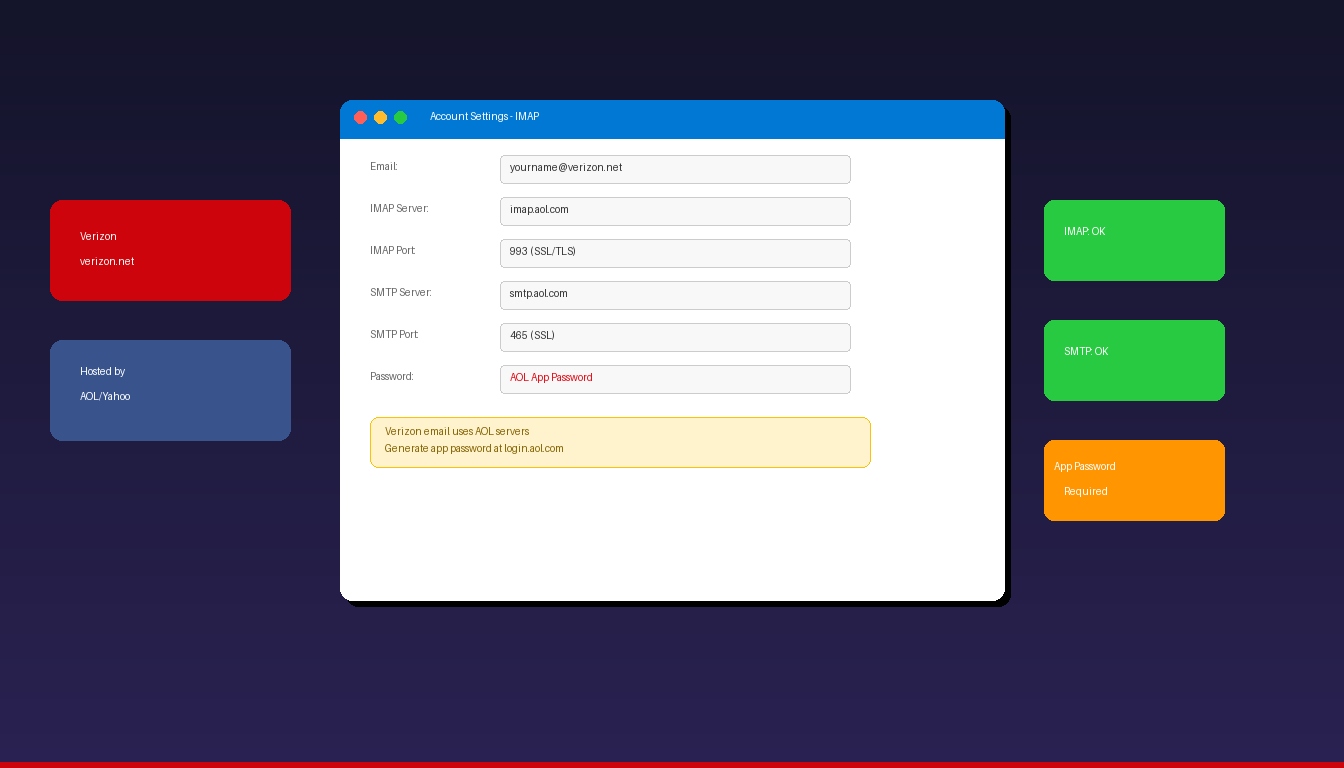
Verizon email (@verizon.net) now runs on AOL infrastructure, which means setup in Microsoft Outlook uses the same IMAP and SMTP servers as AOL email. You need an AOL app password for authentication since your regular Verizon password will not work in third-party email apps. Once connected, add a professional email signature to complete your setup.
Key Takeaways
- Verizon email uses AOL servers: IMAP
imap.aol.comon port 993 (SSL) and SMTPsmtp.aol.comon port 465 (SSL) or 587 (STARTTLS). - You must generate an app password from your AOL Account Security page — your regular Verizon email password will not work in Outlook.
- Manual IMAP setup is recommended over Outlook’s auto-detect, which may apply incorrect defaults for Verizon/AOL accounts.
What Are the IMAP and SMTP Settings for Verizon Email?
Verizon email connects to Outlook using AOL’s servers: imap.aol.com for incoming mail and smtp.aol.com for outgoing mail, both requiring SSL encryption.
| Setting | Value |
|---|---|
| Incoming Server (IMAP) | imap.aol.com |
| IMAP Port | 993 |
| IMAP Encryption | SSL/TLS |
| Outgoing Server (SMTP) | smtp.aol.com |
| SMTP Port | 465 (SSL) or 587 (STARTTLS) |
| SMTP Encryption | SSL/TLS or STARTTLS |
| Username | Your full Verizon email ([email protected]) |
| Password | AOL app password (not your regular password) |
| SMTP Authentication | Required |
Some users report success with alternative server addresses incoming.verizon.net and smtp.verizon.net, but AOL servers are the officially recommended option per AOL Help. For detailed SMTP configuration, see our Outlook SMTP settings guide.
Why Does Verizon Email Use AOL Servers?
Verizon sold its email service to AOL (now part of Yahoo) — all @verizon.net email accounts are hosted on AOL infrastructure, using the same servers, authentication, and app password system as @aol.com accounts.
| Domain | Infrastructure | IMAP Server | SMTP Server |
|---|---|---|---|
| @verizon.net | AOL/Yahoo | imap.aol.com | smtp.aol.com |
| @aol.com | AOL/Yahoo | imap.aol.com | smtp.aol.com |
| @att.net | Yahoo | imap.mail.att.net | smtp.mail.att.net |
| @yahoo.com | Yahoo | imap.mail.yahoo.com | smtp.mail.yahoo.com |
Your @verizon.net email address continues to work — only the backend servers changed. For setup guides on related providers, see our AOL email in Outlook and AT&T email in Outlook guides.
How Do I Generate an App Password for Verizon Email?
Sign in to your AOL account, go to Account Security, and generate a 16-character app password — this is required for Outlook since Verizon/AOL blocks regular passwords in third-party apps.
- Go to login.aol.com and sign in with your @verizon.net email address and password.
- Click your profile name > Account Info > Account Security.
- Enable Two-step verification if not already on (required for app passwords).
- Scroll to Generate and manage app passwords.
- Click Generate app password.
- Select Outlook Desktop from the dropdown.
- Click Generate and copy the 16-character password.
- Use this app password in Outlook instead of your regular password.
If you cannot sign in to AOL with your Verizon email, try resetting your password at login.aol.com/forgot using your @verizon.net address.
How Do I Add Verizon Email to Outlook?
Use manual IMAP setup in Outlook — auto-detect may apply incorrect settings for Verizon/AOL accounts.
Method 1: Manual IMAP Setup (Recommended)
- Open Outlook and click File > Add Account.
- Enter your Verizon email address, click Advanced options, check Let me set up my account manually.
- Click Connect and select IMAP.
- Enter the server settings:
- Incoming: imap.aol.com, Port: 993, Encryption: SSL/TLS
- Outgoing: smtp.aol.com, Port: 465, Encryption: SSL/TLS
- Enter your app password (not regular password).
- Click Connect.
Method 2: OAuth (Newer Outlook Versions)
In Microsoft 365 Outlook or Outlook 2024, entering a @verizon.net address may trigger a Yahoo/AOL OAuth sign-in page:
- Click File > Add Account.
- Enter your Verizon email address.
- Click Connect — a Yahoo/AOL sign-in page appears.
- Sign in with your regular Verizon password.
- Authorize Outlook access.
If OAuth works, no app password is needed. If it does not appear, fall back to manual IMAP setup with the app password.
Verify SMTP Authentication
If sending fails after setup:
- Go to File > Account Settings > double-click your Verizon account.
- Click More Settings > Outgoing Server tab.
- Check My outgoing server (SMTP) requires authentication.
- Select Use same settings as my incoming mail server.
- Click OK and test sending.
Why Is My Verizon Email Not Working in Outlook?
The most common cause is using your regular Verizon password instead of an AOL app password — generate an app password from AOL Account Security.
Troubleshooting Checklist
| Issue | Fix |
|---|---|
| Regular password rejected | Generate AOL app password |
| Wrong IMAP server | Use imap.aol.com (not mail.verizon.net) |
| SMTP port blocked | Use port 465 (SSL) or 587 (STARTTLS) |
| SMTP auth disabled | Enable in More Settings > Outgoing Server |
| Password loop | Clear aol.com entries in Windows Credential Manager |
| Auto-detect fails | Use manual IMAP setup instead |
| Cannot sign in to AOL | Reset password at login.aol.com/forgot |
Clear Cached Credentials
- Close Outlook.
- Open Windows Credential Manager (search in Start menu).
- Under Windows Credentials, find and remove entries for
aol.com,verizon.net, oryahoo.com. - Restart Outlook and enter your app password.
Can I Use Verizon Email With the New Outlook?
Yes — the new Outlook for Windows supports Verizon email through Yahoo/AOL OAuth authentication or manual IMAP setup with an app password.
- Open new Outlook > Settings > Add account.
- Enter your @verizon.net email address.
- If a Yahoo/AOL sign-in page appears — sign in with your regular password.
- If no sign-in page appears — select IMAP and enter server settings with your app password.
For adding other email providers, see our comprehensive Outlook email setup guide covering all provider types.
How Do I Set Up Verizon Email on Outlook Mobile?
The Outlook mobile app typically uses Yahoo/AOL OAuth for Verizon email — enter your @verizon.net address and sign in through the AOL page.
- Open the Microsoft Outlook app on iPhone or Android.
- Tap Add Account.
- Enter your @verizon.net email address.
- A Yahoo/AOL sign-in page should appear — sign in with your regular password.
- If auto-setup fails, toggle Advanced Settings and enter IMAP/SMTP settings with your app password.
If you need Outlook desktop with full Verizon email support, Microsoft Office 2024 Professional Plus ($199.99) includes the classic Outlook application.
Frequently Asked Questions
Is Verizon email the same as AOL email?
Verizon email runs on AOL infrastructure, but they are separate accounts. Your @verizon.net address uses AOL’s IMAP and SMTP servers behind the scenes. You sign in to AOL with your @verizon.net address to manage security settings and generate app passwords. Your email address, contacts, and messages remain unchanged.
Do I need an app password for Verizon email in Outlook?
Yes, for manual IMAP setup. Your regular Verizon password will not work in third-party email apps. Generate a 16-character app password from AOL Account Security (login.aol.com > Account Security > Generate app password). If your Outlook version supports OAuth (Yahoo/AOL sign-in page), you can use your regular password through that flow instead.
What is the IMAP server for Verizon email?
The incoming IMAP server is imap.aol.com on port 993 with SSL/TLS encryption. The outgoing SMTP server is smtp.aol.com on port 465 (SSL) or 587 (STARTTLS). Use your full @verizon.net email address as the username.
Can I still use my @verizon.net email address?
Yes. Despite the migration to AOL servers, @verizon.net email addresses continue to work indefinitely. You can send and receive email from your @verizon.net address through Outlook, the AOL webmail interface (mail.aol.com), or any IMAP-compatible email app.